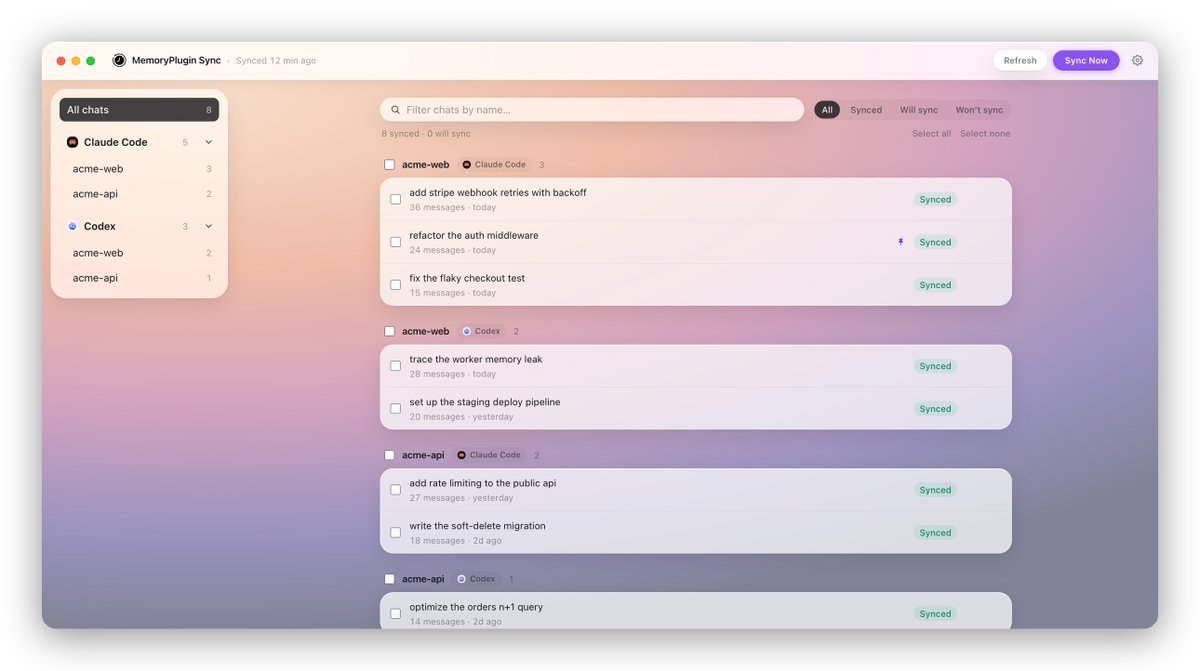
MemoryPlugin ships macOS Sync for Claude Code, Codex and Cursor sessions
MemoryPlugin has released MemoryPlugin Sync, a macOS application that archives local coding agent conversations alongside its existing browser chat history. According to Testing Catalog, the tool ingests sessions from Claude Code, Codex, and Cursor into a unified archive. The company states that only user prompts and assistant replies are transmitted from the device; code snippets, tool output, file contents, terminal commands, and model thinking remain on the local machine. For developers who juggle multiple AI assistants, the launch offers a single searchable record of agent interactions without exporting sensitive project artifacts. The announcement does not specify pricing, enterprise controls, or support for agents beyond the three named platforms, leaving open questions about rollout scope and long-term data retention policies.
MemoryPlugin ships macOS Sync for Claude Code, Codex and Cursor sessions
MemoryPlugin has shipped MemoryPlugin Sync, a macOS app that pulls local coding agent sessions into the same archive as its browser chat history. Only prompts and assistant replies leave the machine, while code, tool output, file contents, terminal commands, and model thinking stay local, according to the company.
Key takeaway
MemoryPlugin Sync gives macOS developers a unified, privacy-filtered archive of Claude Code, Codex, and Cursor sessions alongside browser chats.
What happened
According to Testing Catalog, MemoryPlugin has shipped MemoryPlugin Sync, a macOS app that pulls local coding agent sessions into the same archive as its browser chat history.
The company says only prompts and assistant replies leave the machine, while code, tool output, file contents, terminal commands, and model thinking stay local; supported agents include Claude Code, Codex, and Cursor.
Evidence
MemoryPlugin shipped a macOS sync app for coding agent sessions
Testing Catalog · attributed
MemoryPlugin has shipped MemoryPlugin Sync, a macOS app that pulls local coding agent sessions into the same archive as its browser chat history.
Only prompts and assistant replies leave the device; code and tool output stay local
Testing Catalog · attributed
Only prompts and assistant replies leave the machine, while code, tool output, file contents, terminal commands, and model thinking stay local, according to the company.
MemoryPlugin Sync archives chats from Claude Code, Codex, and Cursor
Testing Catalog · attributed
MemoryPlugin Sync brings coding agent session sync to macOS, archiving chats from Claude Code, Codex, and Cursor.
Why it matters
As coding workflows spread across multiple agent tools, session fragmentation makes it harder to audit decisions and reuse context; a local-first sync layer addresses that gap without exfiltrating code or tool output.
Limits and uncertainties
The packet reports only MemoryPlugin's claims about what data stays local; no independent verification is cited.
Pricing, enterprise controls, and support for agents beyond Claude Code, Codex, and Cursor are not described in the packet.
Practical implications
macOS developers using Claude Code, Codex, or Cursor can consolidate agent session history with browser chats in one archive.
Teams evaluating the tool should confirm the stated data boundary against their security and compliance requirements before deployment.
What to watch
Whether MemoryPlugin adds sync support for additional coding agents or non-macOS platforms.
Independent audits or user reports validating that code, tool output, and file contents remain local.