Grok Imagine adds per-layer transparent PNG downloads after automatic segmentation
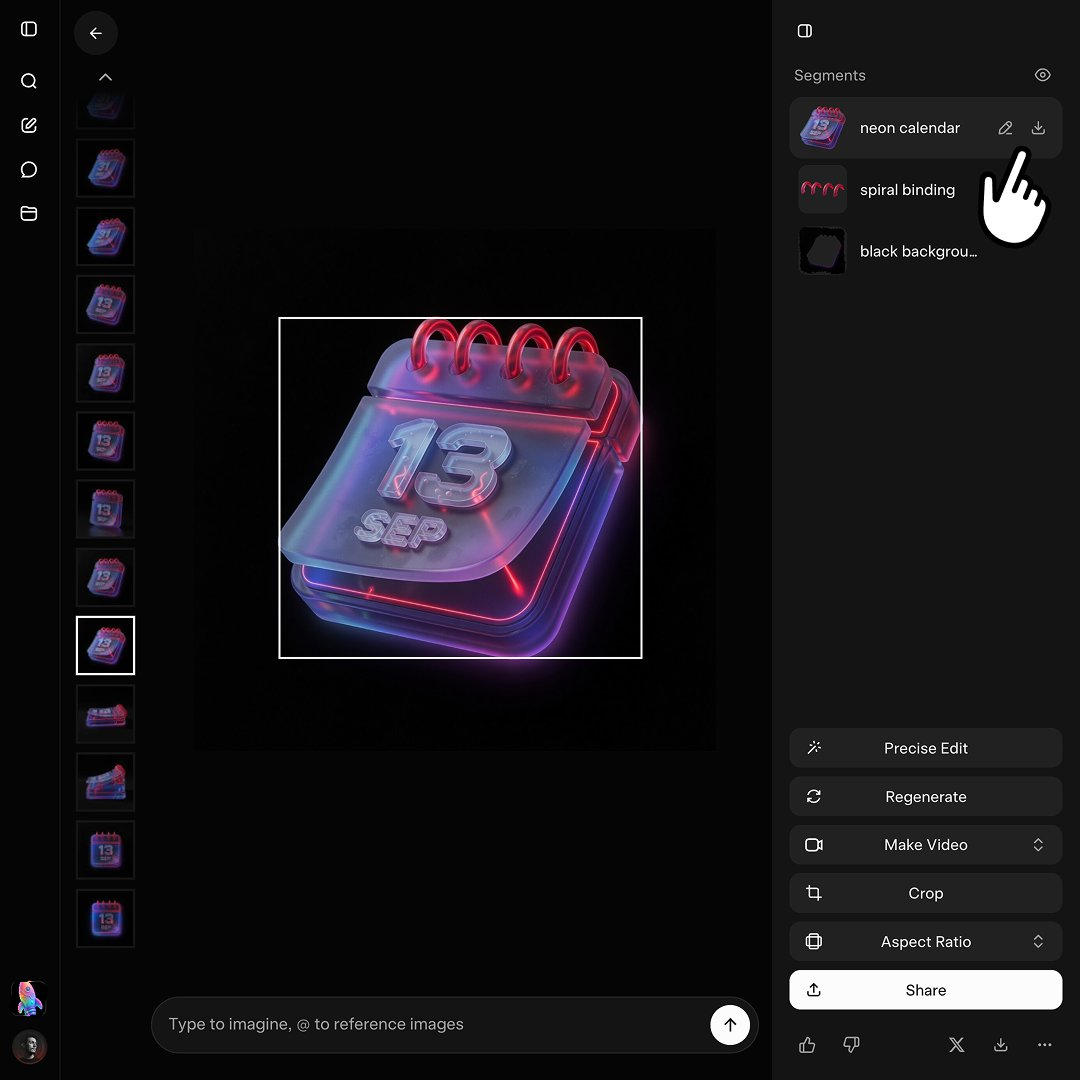
Grok Imagine, xAI's image generation tool, now automatically segments generated images so users can download transparent PNG files for each detected layer. Rather than manually masking or separating elements from a flat render, creators can export discrete parts directly from a single generation. The change is positioned for production workflows that need separable assets, including layered 3D icon builds where foreground, background, and object elements must stay independently editable. For designers assembling UI kits or game assets, per-layer transparency can cut retouching time and shorten the path from one prompt to reusable components. The detail was reported on X by @doganuraldesign, not in an official product changelog, so rollout scope, supported formats, and segmentation quality remain undocumented beyond that post.
Grok Imagine adds per-layer transparent PNG downloads after automatic segmentation
Grok Imagine now segments generated images automatically, letting users download transparent PNGs for each layer. The update targets workflows like 3D icon creation where separate layers are needed.
Key takeaway
Grok Imagine's automatic segmentation enables per-layer transparent PNG downloads, streamlining asset prep for layered 3D icon and UI workflows.
What happened
According to @doganuraldesign on X, Grok Imagine now segments generated images automatically so users can download transparent PNG files for each detected layer.
The post frames the update for workflows such as 3D icon creation, where separate composable layers are needed instead of a single flattened image.
Evidence
Grok Imagine adds per-layer transparent PNG downloads after automatic segmentation.
@doganuraldesign on X · attributed
Grok Imagine adds per-layer transparent PNG downloads after automatic segmentation
Grok Imagine segments generated images automatically and targets 3D icon workflows needing separate layers.
@doganuraldesign on X · attributed
Grok Imagine now segments generated images automatically, letting users download transparent PNGs for each layer. The update targets workflows like 3D icon creation where separate layers are needed.
Why it matters
Layered transparent exports turn generated images into editable production inputs, reducing manual cutout work for builders who need separable assets.
Limits and uncertainties
Details come from a single X post by @doganuraldesign, not an official xAI changelog, so rollout scope and segmentation quality are unverified.
Practical implications
Builders doing 3D icons or layered UI assets can test Grok Imagine exports as separate transparent PNG layers instead of manual masking.
What to watch
Whether xAI publishes official documentation on layer segmentation behavior, export limits, and supported image types.