Anthropic adds /design skill to Claude Code in research preview
Anthropic has introduced a new /design skill for Claude Code, currently available in research preview. The capability imports Claude Design's artboard workflow into both the CLI and Desktop environments, with the implementation built on artifacts. Users can invoke /design to generate editable UI artboards, select a preferred layout, refine it, and then ask Claude to implement the design in code. According to reporting from Claude's developer channel on X, this moves visual UI exploration directly into the coding agent workflow rather than keeping design and implementation separate. Because the feature ships as a research preview, capabilities, stability, and availability may evolve before broader release. Teams evaluating AI-assisted development should treat the artboard-to-implementation loop as an early integration point worth testing, not yet a production dependency.
Anthropic adds /design skill to Claude Code in research preview
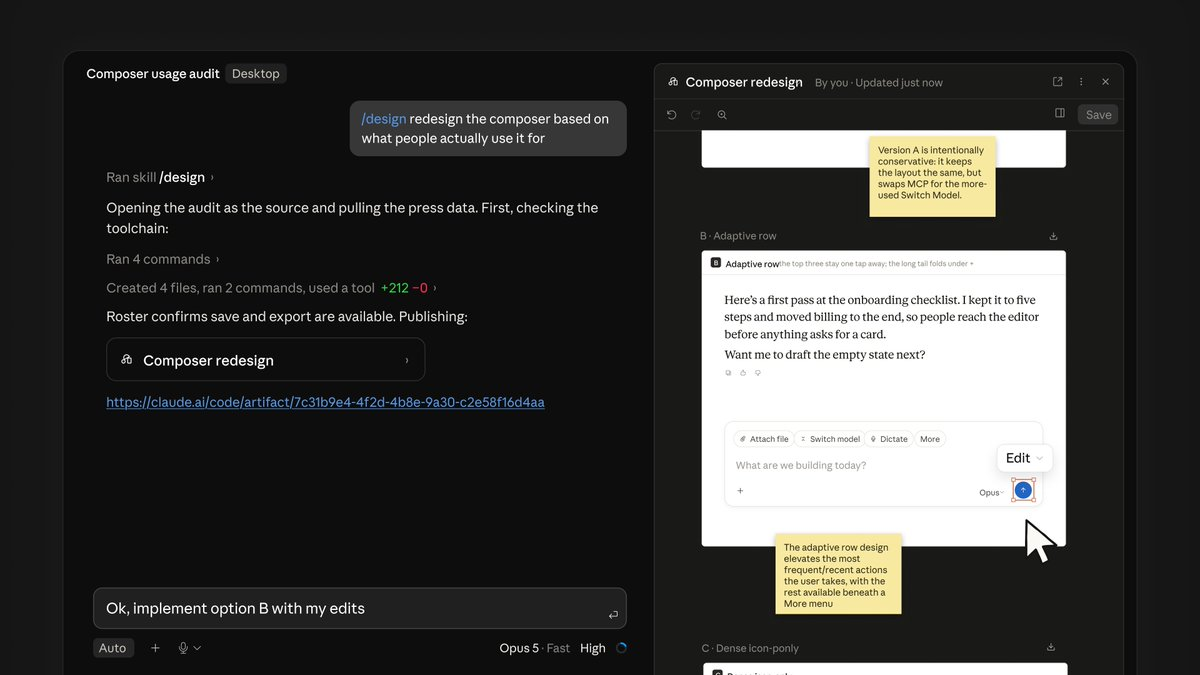
The new /design skill (research preview) brings Claude Design's artboard workflow into the CLI and Desktop, built on artifacts. Run /design to get editable artboards for your UI — pick one, tweak it, then have Claude implement it.
Key takeaway
Claude Code now ships a research-preview /design skill that turns artifact-based artboards into a pick-tweak-implement UI loop inside CLI and Desktop.
What happened
Anthropic announced a new /design skill for Claude Code in research preview, according to posts on Claude's developer channel on X.
The skill brings Claude Design's artboard workflow into the CLI and Desktop, built on artifacts; users run /design to get editable UI artboards, pick one, tweak it, then have Claude implement it.
Evidence
Anthropic added a /design skill to Claude Code in research preview.
X · attributed
Anthropic adds /design skill to Claude Code in research preview
The /design skill brings Claude Design's artboard workflow into the CLI and Desktop, built on artifacts.
X · attributed
The new /design skill (research preview) brings Claude Design's artboard workflow into the CLI and Desktop, built on artifacts.
Users can run /design to get editable UI artboards, pick one, tweak it, then have Claude implement it.
X · attributed
Run /design to get editable artboards for your UI — pick one, tweak it, then have Claude implement it.
Why it matters
Embedding Claude Design's artboard flow in the agent may shorten handoffs between visual exploration and code generation, but preview status means teams should validate fit before relying on it in delivery pipelines.
Limits and uncertainties
The /design skill is labeled research preview, so scope, stability, and availability may change before general release.
The packet provides no rollout requirements, pricing, or platform-specific limitations beyond CLI and Desktop.
Practical implications
Builders can trial /design inside Claude Code CLI and Desktop to prototype UIs before asking Claude to implement a chosen artboard.
Operators should not treat the artboard-to-code path as a production dependency until the feature leaves research preview.
What to watch
Whether /design exits research preview and what changes to artifacts, artboards, or implementation behavior follow.
Parity and workflow differences between Claude Code CLI and Desktop for the /design artboard loop.
Original reporting: Claude Code can design now. The new /design skill (research preview) brings Claude Design's artboard workflow into the CLI and Desktop, built on artifacts.
Run /design to get edit